


WordPress to Webflow

Migration
Move your website from WordPress to Webflow for faster performance, better security, and easier management.

WordPress to Webflow Migration

Move your website from WordPress to Webflow for faster performance, better security, and easier management.
WordPress to Webflow Migration is the process of moving an existing WordPress website to Webflow while maintaining the site’s content, structure, branding, and functionality. This migration includes transferring pages, blog posts, images, CMS collections, SEO settings, and design elements into Webflow’s modern no-code platform. The goal is to create a cleaner, faster, and more visually refined website that offers improved performance, responsiveness, and easier content management.

By migrating from WordPress to Webflow, businesses can reduce dependency on multiple plugins, simplify website maintenance, and gain greater creative freedom through Webflow’s advanced visual design capabilities. The transition also helps improve site speed, security, and scalability while providing a more intuitive editing experience for teams and clients. Whether it’s a corporate website, portfolio, or ecommerce platform, Webflow delivers a streamlined and future-ready web experience.
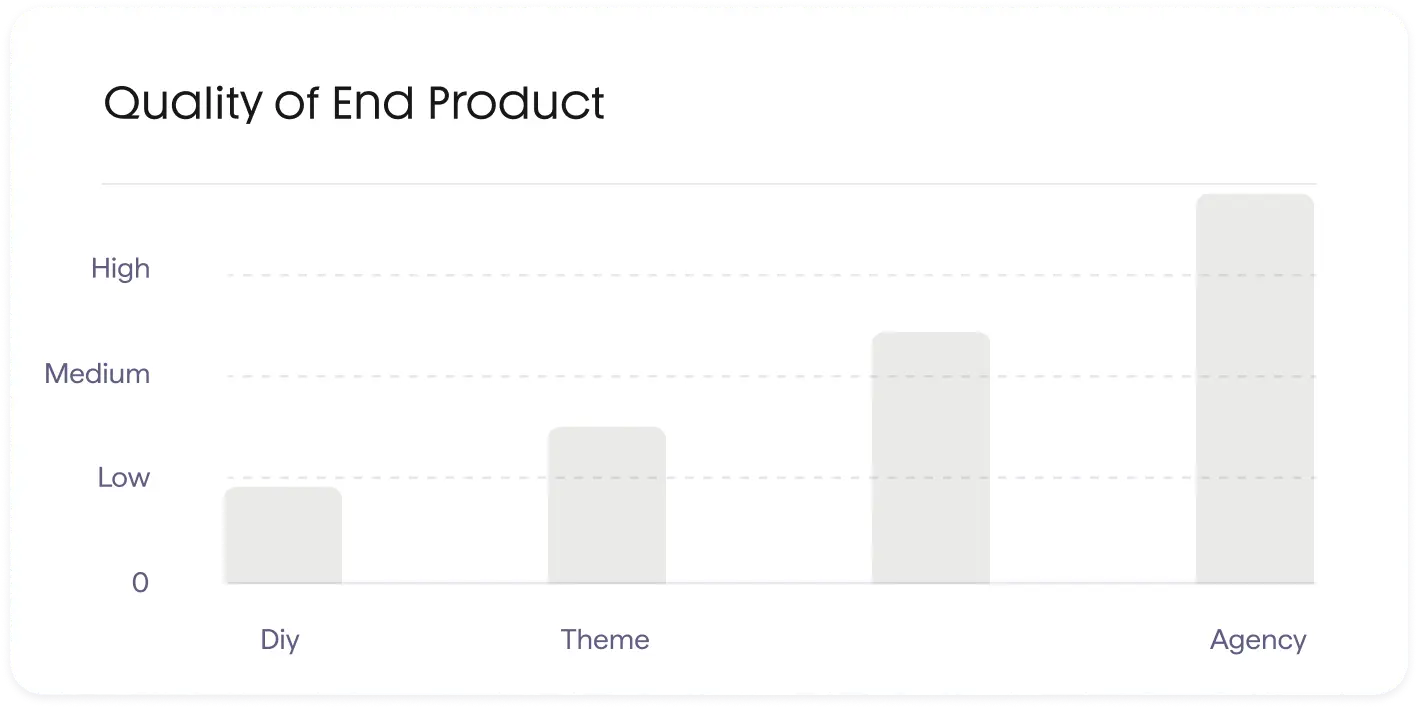
Benefits of Webflow vs WordPress

We follow a rigorous 8-step process to ensure your migration is seamless, secure, and optimized for growth.
Faster website performance
Faster Website Performance helps create a smoother and more responsive user experience by reducing loading times and improving overall website speed. Visitors can access content quickly, resulting in better engagement and easier navigation across all devices.

A well-optimized website also supports improved SEO rankings, lower bounce rates, and higher conversion potential. With cleaner code and optimized assets, businesses can deliver a faster, more reliable, and professional online experience.
Improved security
Improved Security helps protect your website from threats, vulnerabilities, and unauthorized access. A secure website ensures safer user interactions and keeps important data protected at all times.

With modern security practices and reduced dependency on outdated plugins, businesses can maintain a more stable and reliable online presence. Stronger security also builds trust and improves overall website performance.
Easier content updates
Easier Content Updates make website management faster and more efficient for teams and businesses. With a user-friendly editing system, content can be updated quickly without requiring advanced technical knowledge.

A streamlined content workflow helps keep websites fresh, accurate, and engaging at all times. It also saves time and allows businesses to focus more on growth and user experience.
Better SEO foundations
Better SEO Foundations help improve your website’s visibility and search engine performance. A well-structured website with clean code, optimized pages, and fast loading speeds makes it easier for search engines to crawl and rank your content.

Strong SEO foundations also support better user experience and long-term organic growth. With proper optimization in place, businesses can attract more traffic, increase online reach, and improve overall digital presence.

Our WordPress to Webflow Migration Process

We follow a rigorous 8-step process to ensure your migration is seamless, secure, and optimized for growth.
Discovery and Audit
Discovery and Audit is the first step in understanding your website’s structure, performance, and overall requirements before migration or redesign. This process involves reviewing content, functionality, SEO setup, design elements, and technical performance to identify opportunities for improvement.
Content and structure
Content and Structure focus on organizing website information in a clear, user-friendly, and scalable way. This includes arranging pages, navigation, and content hierarchy to improve accessibility and overall user experience.
Mockups and Design
Mockups and Design help visualize the website’s layout, style, and user experience before development begins. This stage focuses on creating clean, modern, and user-friendly designs that align with the brand’s identity and goals.
SEO Preservation
SEO Preservation ensures that a website maintains its existing search engine rankings, traffic, and visibility during migration or redesign. It involves carefully handling URLs, redirects, metadata, and site structure so that search engines can continue to index the content correctly without losing performance.
Webflow build
Webflow Build is the development phase where the approved designs and structure are implemented inside Webflow. It involves turning mockups into a fully functional, responsive website using Webflow’s visual development tools without heavy coding.
Performance optimization
Performance Optimization focuses on improving how fast and efficiently a website loads and runs. It involves optimizing images, code, scripts, and overall site structure to reduce load times and ensure smooth browsing across all devices.
Website Deployment
Website Deployment is the final stage of launching a website to a live server so it becomes accessible to users. It includes setting up hosting, connecting the domain, and ensuring all files, pages, and features are properly published and functioning as expected.
Optimize
Website Deployment is the final stage of launching a website to a live server so it becomes accessible to users. It includes setting up hosting, connecting the domain, and ensuring all files, pages, and features are properly published and functioning as expected.

How much it cost to move from WordPressto Webflow

We follow a rigorous 8-step process to ensure your migration is seamless, secure, and optimized for growth.
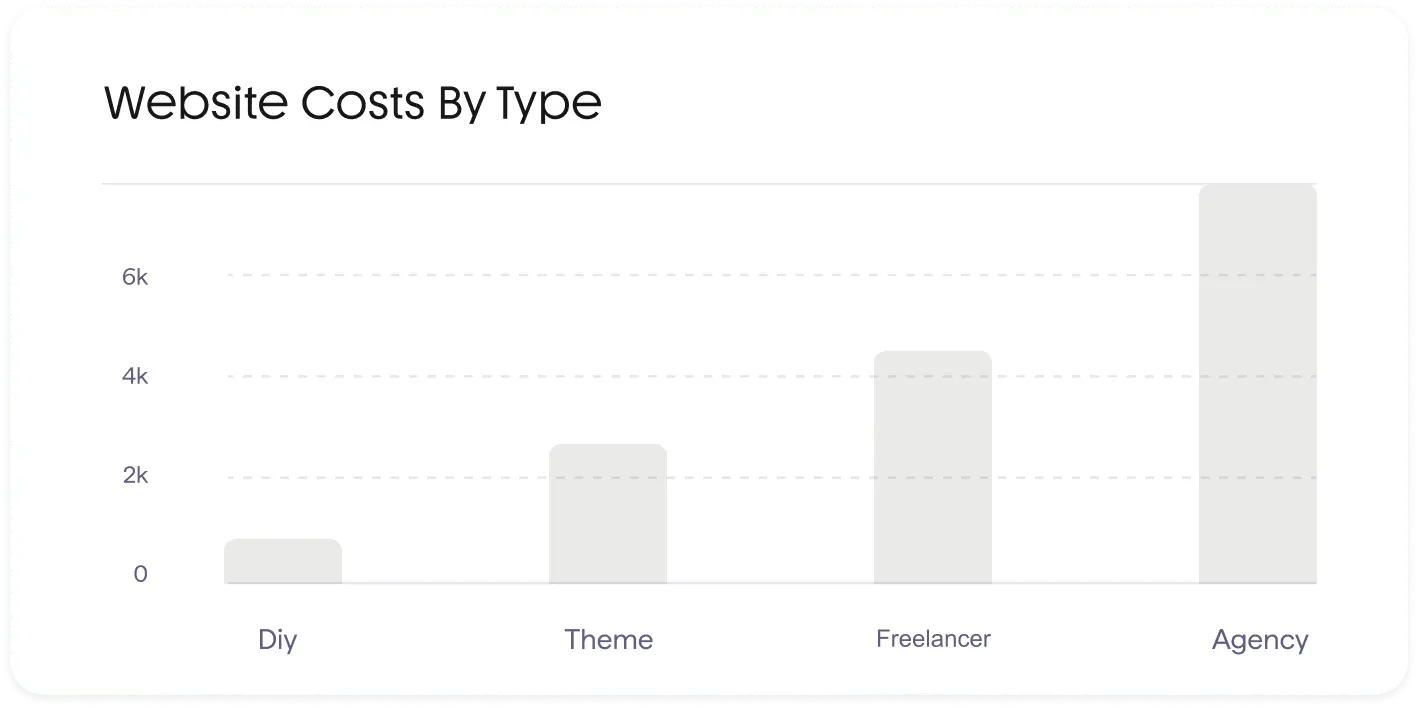
How much it cost to move from WordPress to Webflow depends on the size of the website, design complexity, and level of SEO and content migration required. A simple migration for small websites is generally more affordable, while larger business or CMS-heavy sites require more planning, redesign, and technical work, which increases the overall cost.

On average, WordPress to Webflow migration can range from around $5,000 to $15,000 for basic to mid-sized sites, and can go higher for complex or enterprise-level projects with full redesign, advanced CMS setup, and SEO preservation. The final cost is influenced by factors like number of pages, integrations, custom design needs, and performance optimization requirements.
Bar chart showing website costs by type: DIY under 1k, Theme around 2.5k, Freelancer about 4k, and Agency near 6k.

What factors should I consider beforemoving from WordPress to Webflow

We follow a rigorous 8-step process to ensure your migration is seamless, secure, and optimized for growth.
Before moving from WordPress to Webflow, it’s important to evaluate your website’s goals, structure, and long-term requirements. Key factors include the size of your site, complexity of content, CMS needs, and whether your current plugins or custom functionalities have equivalents in Webflow. You should also consider your design flexibility requirements and how much control you want over layout and visual development.

Pros:
Webflow offers a more modern, visual development experience where you can design and build websites without relying heavily on plugins or external tools. It provides cleaner code output, faster performance, and better control over responsive design and animations. This makes it especially useful for teams focused on design quality and speed of execution.
It also simplifies maintenance by reducing dependency on multiple plugins, which often cause compatibility or security issues in WordPress. With built-in hosting, security, and CMS features, Webflow allows for easier site management, improved stability, and more consistent performance.

Cons:
Webflow has a learning curve, especially for users familiar with WordPress’s plugin-based ecosystem. Some advanced or highly custom functionalities available in WordPress may require workarounds or may not be fully supported in Webflow.
Another limitation is cost and flexibility for large-scale sites. Webflow’s pricing can become higher for complex CMS-driven projects, and migration requires careful handling of SEO, content structure, and integrations to avoid potential data or ranking issues.
Case Study

WordPress to Webflow
Migration Case Study

98
Lighthouse Score
Up from 42 across all core web vitals - performance, accessibility, SEO, and best practices.
+34%
Conversion Rate
Booking conversions increased in the first 3 months post-launch through streamlined UX flows.
-22%
Bounce Rate
Reduced through intuitive visual storytelling and faster page load times.
UX
User Experience
Modernised design language, custom interactions, and a fully responsive layout aligned with brand identity.

Wordpress to Webflow

Migration faqs
Everything you need to know about our migration services and methodology.
How long does it take to migrate a website from WordPress to Webflow?
Typically 4–8 weeks depending on site complexity, number of pages, and how much custom design work is involved. We'll give you a precise timeline after the discovery audit.
Will I lose my SEO when migrating to Webflow?
No. When handled properly, your SEO is preserved. We implement 301 redirects, retain metadata and site structure, and re-submit sitemaps. In many cases, performance improves post-migration due to faster load speeds.
How much does a typical WordPress to Webflow migration cost?
Most projects fall between £3,000 – £10,000+, depending on site size, CMS complexity, design requirements, SEO scope, and integrations.

Your Website Might Be Losing
70-80% ConversionsOur

Get a free audit with actionable improvements, strategic growth and how to fix it.
X

Website Audit Report

Fill the form below and Get a free audit with actionable improvements, strategic growth and how to fix it.
Thank you! Your submission has been received!
Oops! Something went wrong while submitting the form.
X

Please complete your details
below to download the report.

Fill the form below and Get a free audit with actionable improvements, strategic growth and how to fix it.
Thank you! Your submission has been received!
Oops! Something went wrong while submitting the form.